Get Email Notification of Facebook Comments on Your WordPress Site


Like many site owners and WordPress websites, we at Lieberman Technologies were using Facebook Comments to encourage conversation on our WordPress blog. The Facebook Comment system worked great for things like authentication, spam prevention and even sharing. What it didn’t do was send email notification to a moderator when a comment was posted to the blog.

So we took that problem and created a solution with a WordPress plugin, titled Facebook Comments Notifier. This plugin adds the Facebook Comment social plugin in place of the default WordPress comments and creates email notifications on successfully posted comments. The email notification includes a time stamp of the submission, the commenter’s name, the comment test, and a link back to the page that the received the comment. If Facebook Comments are already in place on your WordPress site, this plugin will perform the email notification functionality.

The plugin’s settings area allows for configurable items such as Facebook AppID and the recipient email(s). You can send notifications to more than one recipient. By default, the plugin will email notifications to the site’s admin email address. A Facebook AppID is not required.
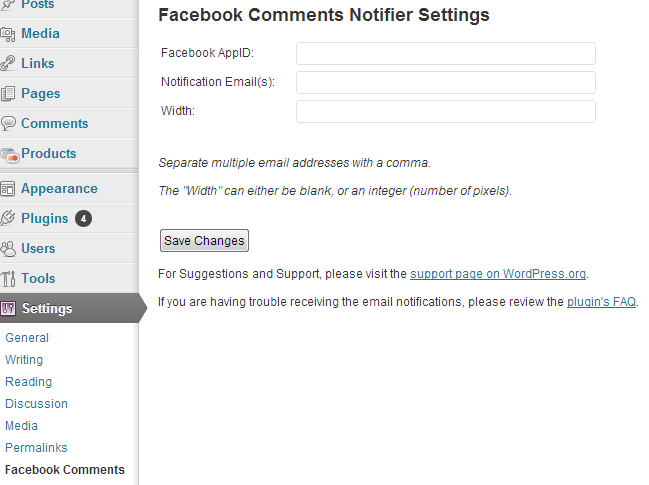
facebook comment notifier for wordpress

Click here to download the WordPress plugin.

As we’ve talked about in this space before, WordPress is a great content managment system that allows for the development of websites of varying complexity.  This new plugin will add to the roster of tools available to WordPress users, making websites even easier to manage.

Posted in Internet and Tagged , by

Like this post? Share It!

10 Responses

  1. Good day! I know this is somewhat off topic but I was wondering if you knew where I could locate a captcha
    plugin for my comment form? I’m using the same blog platform as yours and I’m having difficulty finding one?
    Thanks a lot!

  2. hello.
    thanks for this good plugin .
    but I want to run Facebook comments while keeping the wordpress comments .

    tell me how please …

  3. todd says:

    thanks for making this plugin available. we have it installed on our blog but it only sends periodic notifications, not all. can you help?

    lifeglimpsed.com

  4. Hopefully this works – we’ve had facebook comments installed on our blog for a while and the only downside is the lack of built-in notification system.

    Thanks for the link – coffee brewed and fingers crossed. Installing it now..

    - Danny

  5. Sean says:

    I’ve installed the FB comments notifier plugin, but I’m not able to get the comments to show up on my pages. I’m thinking there’s something simple that I’m not understanding, and it’s frustrating. At this point, I don’t even care about the emails, I just want the comments. Can you help me? What do I need to do to get the comments section to show up? I was thinking it was automatic once the plugin is activated. I appreciate your help.

Leave Your Comments

Your email address will not be published. Required fields are marked *

You may use these HTML tags and attributes: <a href="" title=""> <abbr title=""> <acronym title=""> <b> <blockquote cite=""> <cite> <code> <del datetime=""> <em> <i> <q cite=""> <strike> <strong>